

Facility managers: Avoid 30% loss with smart thermostat prechecks
A commercial smart thermostat is the highest-impact first control upgrade for most small-to-medium sites, typically cutting HVAC energy use by 10–30%, while adding remote monitoring and demand-response eligibility. That answer changes if your equipment lacks a 24VAC terminal block, your Wi-Fi can’t handle enterprise authentication, or nobody on site can commission BACnet points properly. Get those three things right first, and the upgrade pays for itself faster than most facility budgets allow for.
TL;DR:
- The effectiveness of smart thermostats depends heavily on proper wiring, existing system compatibility, and thorough commissioning, especially on inverter-driven or older systems.
- Compatibility checks should prioritize wiring and protocol support like BACnet or Modbus before selecting a device, to avoid disabling equipment or requiring additional modules.
- Professional installation and commissioning are crucial, including verified wiring diagrams, schedule testing, and documentation to prevent efficiency losses or warranty voiding.
- IT coordination should occur before hardware ordering, with clear policies on network security, VLAN placement, and firmware updates to avoid rollout delays.
- Cost savings vary based on baseline building schedules and equipment condition, with potential energy reductions of 10–30%, and higher savings possible for rooftop unit upgrades.
Table of Contents
- Who benefits most from a commercial smart thermostat upgrade
- What features should a commercial thermostat actually have?
- Will it work with your existing rooftop units and inverter systems?
- Why installation and commissioning need a professional
- How do you coordinate with IT before installation?
- How much energy and money will you actually save?
- What belongs in your RFP or purchase order?
- How Akita approaches commercial smart thermostat projects
- Why most thermostat advice skips the part that actually matters
- Get a site survey before you commit to hardware
- Sources
- FAQ
Who benefits most from a commercial smart thermostat upgrade
Multi-zone buildings with inconsistent occupancy get the biggest win: retail units with variable trading hours, offices with underused conference rooms, and light industrial units running fixed schedules regardless of actual demand. If your maintenance team is still driving between sites to adjust a setpoint, that’s the clearest sign you’re overdue.
Portfolio operators managing several properties see the fastest payback because centralised scheduling eliminates repeat truck rolls. A retail chain, for instance, can shift every store’s setback schedule from one dashboard rather than phoning each manager. Single-site owners with one rooftop unit and a stable schedule will see a smaller, though still real, benefit. The upgrade matters most where behaviour varies daily and someone is currently guessing at the right temperature rather than measuring it.
What features should a commercial thermostat actually have?
Residential smart thermostats are built for one thermostat, one furnace, one household routine. Commercial buildings need something closer to a controls platform. Before you sign a purchase order, confirm the device supports:
- Multi-stage heating and cooling, plus multi-zone scheduling across the building
- Humidity sensing and economiser control for buildings with fresh-air requirements
- Open protocol support, specifically BACnet, Modbus, or a documented REST API, rather than a closed cloud-only integration
- A clear licensing model (per-device fees add up fast across a 40-thermostat site)
- Local schedule retention, so setpoints still run correctly if the internet drops
- Bulk provisioning and remote diagnostics for fleets, not single-unit configuration only
Trane defines a genuine commercial smart thermostat as one built for commercial sequences, occupancy scheduling, and BAS integration, not a repackaged home device with a bigger screen.
Pro Tip: Ask vendors for their licensing terms in writing before the demo, not after. Per-device annual fees are the single most common budget surprise in multi-site rollouts.
Will it work with your existing rooftop units and inverter systems?
This is where most procurement mistakes happen. Check the physical wiring before you check the feature sheet.
- Confirm there’s a 24VAC terminal block behind the existing thermostat. No terminal block usually means a PTAC, ductless mini-split, or older packaged unit that a standard smart thermostat can’t wire into directly.
- Photograph the existing subbase and wiring before removal, and keep the equipment nameplate details handy for the installer.
- Check OEM compatibility notes for inverter-driven or VRF systems specifically, since these are the most common failure point.
Wiring a generic third-party thermostat straight into an inverter-driven system frequently disables the unit’s native modulation, forcing it into blunt on/off cycling instead of the fine-grained output it was designed for. Airzone’s integration guidance recommends a protocol gateway or manufacturer integration module in these cases, which preserves the original communication layer rather than overriding it.
Pro Tip: Where mixed equipment exists across a site, commercial WiFi thermostat guidance suggests treating older PTACs and mini-splits as a separate hybrid problem, often solved with IR-based gateways rather than direct wiring.
Why installation and commissioning need a professional
Commercial thermostat installation is a professional-only job on almost every site with staged equipment, BMS integration, or higher-voltage control wiring. This isn’t about brand loyalty to an installer; it’s about what a wrong connection actually does to the equipment.
A proper commissioning handover should include:
- As-built wiring diagrams for every connected zone
- A BACnet or Modbus device list with point mapping, if integrating with a BMS
- Verified occupancy schedules tested against real building hours, not assumed ones
- A signed commissioning report confirming staging and setpoints behave as specified
Labour time scales with per-device wiring complexity and any network configuration required on top of it, so a 30-thermostat site with BMS integration takes considerably longer than 30 standalone units. Run a pilot on one or two zones before committing to a full rollout. Improperly installed commercial thermostats can reduce system efficiency by up to 30% and may void manufacturer warranties outright, which erases any energy savings the upgrade was meant to deliver.
How do you coordinate with IT before installation?
Facility teams and IT departments too often work in isolation on smart thermostat projects, and that’s usually where the rollout stalls. Loop IT in before you order hardware, not after installation day.
- Decide upfront whether devices sit on a dedicated IoT VLAN, a guest network, or the corporate network, and get that agreed in writing.
- Avoid devices that require 802.1X enterprise authentication or captive-portal logins if your WLAN team can’t easily support them at scale.
- Use hardwired Ethernet for any panel controlling critical equipment; reserve cellular gateways for remote or disconnected sites without reliable Wi-Fi.
- Agree on firmware update policy and account governance before go-live, since shared admin logins across dozens of devices are a common weak point.
The CISA IoT security advisory flags exactly this failure pattern: enterprise network policies routinely block IoT devices that weren’t provisioned correctly from the start.
Pro Tip: Ask your installer to register gateway devices with IT during the site survey, not the day of installation. It’s the single fastest way to avoid a delayed go-live.
How much energy and money will you actually save?
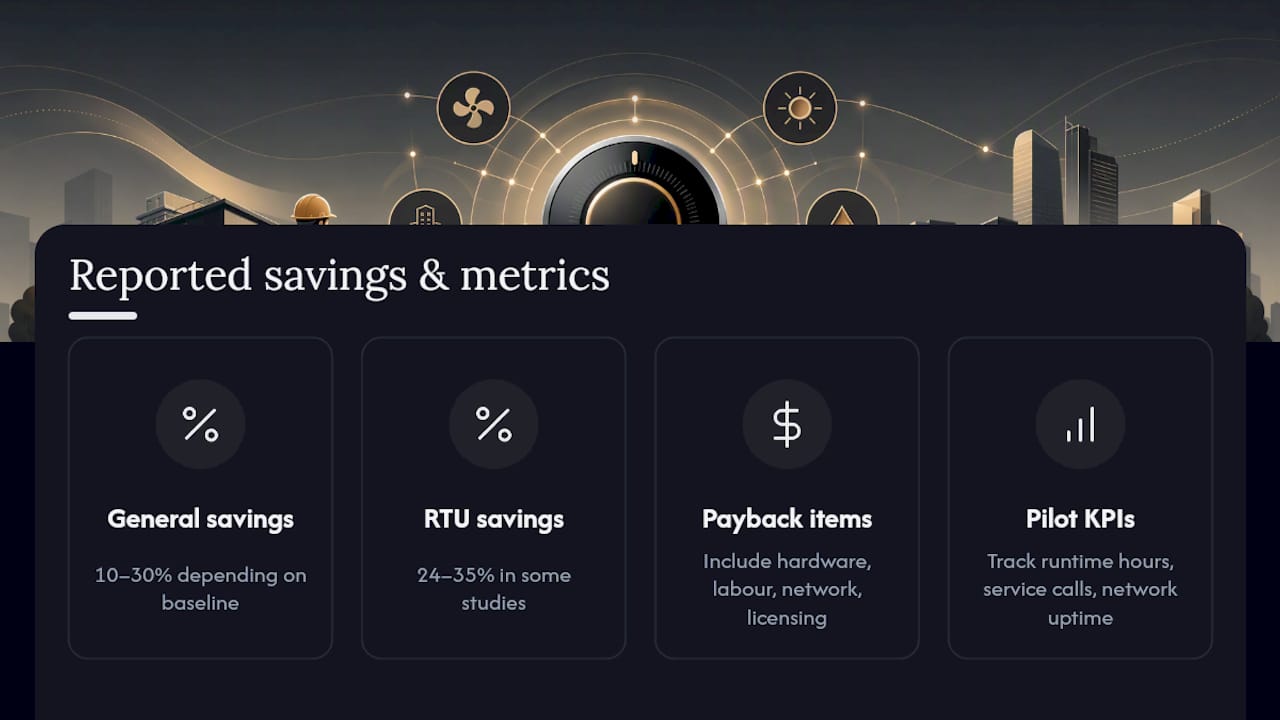
The 10–30% figure is a genuine range, not a marketing rounding trick, and where you land in it depends on your baseline. A building with no scheduling at all sits near the top of that range; one already running decent setbacks sits nearer the bottom. Equipment condition and occupancy variability move the number further in either direction.
Rooftop-unit-specific retrofits have shown even stronger results in some studies, with 24–35% savings reported for RTU control upgrades under certain conditions. Demand-response participation and local utility rebates can shorten payback meaningfully, so check enrolment requirements before finalising your budget. A realistic payback calculation includes hardware, labour, any network upgrades, and per-device licensing, not just the sticker price of the thermostat. For pilots, track runtime hours, service call frequency, and network uptime as your core KPIs.
What belongs in your RFP or purchase order?
Copy this structure directly into procurement documents so every vendor bids against the same requirements:
- Technical requirements: staged heating/cooling support, BACnet/Modbus or documented API access, and confirmed power/wiring compatibility with existing terminal blocks
- Network and security terms: VLAN or guest-network provisioning, account governance model, and firmware update policy stated explicitly
- Commissioning deliverables: as-built wiring diagrams, a signed commissioning report, and verified schedule testing before handover
- Warranty and licensing: written per-device licensing costs, warranty terms, and confirmation that professional installation won’t void manufacturer cover
- Pilot clause: a trial run on your hardest site first, ideally the location with the weakest Wi-Fi and oldest equipment, before any fleet-wide commitment
How Akita approaches commercial smart thermostat projects
Akita’s commercial air conditioning installation work follows the same logic this guide sets out: check compatibility before quoting, coordinate network access before install day, and hand over proper documentation rather than a device that simply works until it doesn’t.
A typical project includes a site survey, photographed wiring and subbases, a written commissioning sheet, and a maintenance plan through air conditioning maintenance or the Comfort Club membership. For deeper technical background on integrating controls with an existing building management system, see Akita’s guide to BMS integration in HVAC.
Why most thermostat advice skips the part that actually matters
Most guides to commercial smart thermostats read like feature comparisons: this many zones, that many integrations, this app rating. That’s the wrong lens entirely. The hardware rarely fails. What fails is the wiring check nobody did, the IT conversation that happened after install day instead of before it, and the commissioning report that never got written.
The conventional advice tells you to pick the “smartest” thermostat. Those two failures account for more stalled projects than any feature gap between competing devices.
If you take one thing from this guide, prioritise the compatibility check over the shopping list. A thermostat with every protocol under the sun is worthless bolted onto an inverter-driven system it can’t properly modulate. Get the wiring, the network plan, and the commissioning deliverables locked down first, and the device you choose becomes a far smaller decision than it feels like today.
— Akita
Get a site survey before you commit to hardware
Most vendors will happily sell you a thermostat before anyone has checked whether your rooftop units have a terminal block or your Wi-Fi can handle enterprise authentication. Akita does it the other way round. As a direct provider of commercial air conditioning installation, Akita surveys the site, photographs the existing wiring, and confirms compatibility before any equipment is ordered, so you’re not the one discovering a mismatch after installation day.
Commissioning and ongoing support once the system is live are handled by specialist teams, with maintenance plans available through membership programs. If you’re planning a pilot on one difficult site before a wider rollout, that’s exactly the right approach, and it’s the one Akita recommends too. Request a site survey through the commercial air conditioning installation page to get a written scope before you spend a penny on hardware.
Sources
FAQ
What is the best smart thermostat for commercial use?
There’s no single best model. The right choice depends on whether your building needs multi-stage staging, BACnet or Modbus integration, and compatibility with your existing terminal blocks, so specify those requirements first and let vendors bid against them.
Do smart thermostats work with any HVAC system?
No. Systems without a 24VAC terminal block, including many PTACs and inverter-driven mini-splits, often can’t take a standard smart thermostat directly, and wiring one in anyway can disable native modulation on inverter-driven equipment. A protocol gateway or manufacturer integration module usually solves this.
What are the downsides of smart thermostats in commercial buildings?
The main risks are network outages that disrupt remote scheduling, incorrect integration with inverter-driven equipment, and improper installation, which can cut efficiency by up to 30% and void warranties. Coordinating IT and using a professional installer avoids most of these failures.
How do I install a commercial electric smart thermostat?
Installation on most commercial systems is a professional job involving higher-voltage wiring, BMS or BACnet configuration, and a commissioning report confirming schedules and staging work correctly. Akita’s commercial installation process includes a site survey and documented handover for exactly this reason.
Do commercial smart thermostats qualify for utility rebates?
Some do, though commercial incentive programmes tend to be smaller and more local than residential schemes. Check with your utility provider or local rebate database before finalising your ROI calculation.